Kubernetes Deployment Strategies: Recreate vs Rolling Update vs Blue-Green vs Canary
Recent Computer Science graduate passionate about DevOps and cloud technologies. Demonstrated ability to build scalable systems through hands-on projects achieving 70% faster deployments using CI/CD pipelines, Kubernetes, and GitOps workflows. Strong foundation in full-stack development with practical experience in AWS, Docker, and security-first automation. Eager to apply DevSecOps expertise and problem-solving skills to build reliable, efficient infrastructure at scale.
In modern application development, deploying updates efficiently while maintaining high availability is a key challenge. Kubernetes provides powerful built-in mechanisms to handle this through deployment strategies.
These strategies determine how new pod versions replace old ones, balancing factors like downtime, risk, resource usage, and rollback speed.
This guide breaks down the four most essential Kubernetes deployment strategies in use today (2025):
Recreate
Rolling Update (the default)
Blue-Green
Canary
1. Recreate Strategy
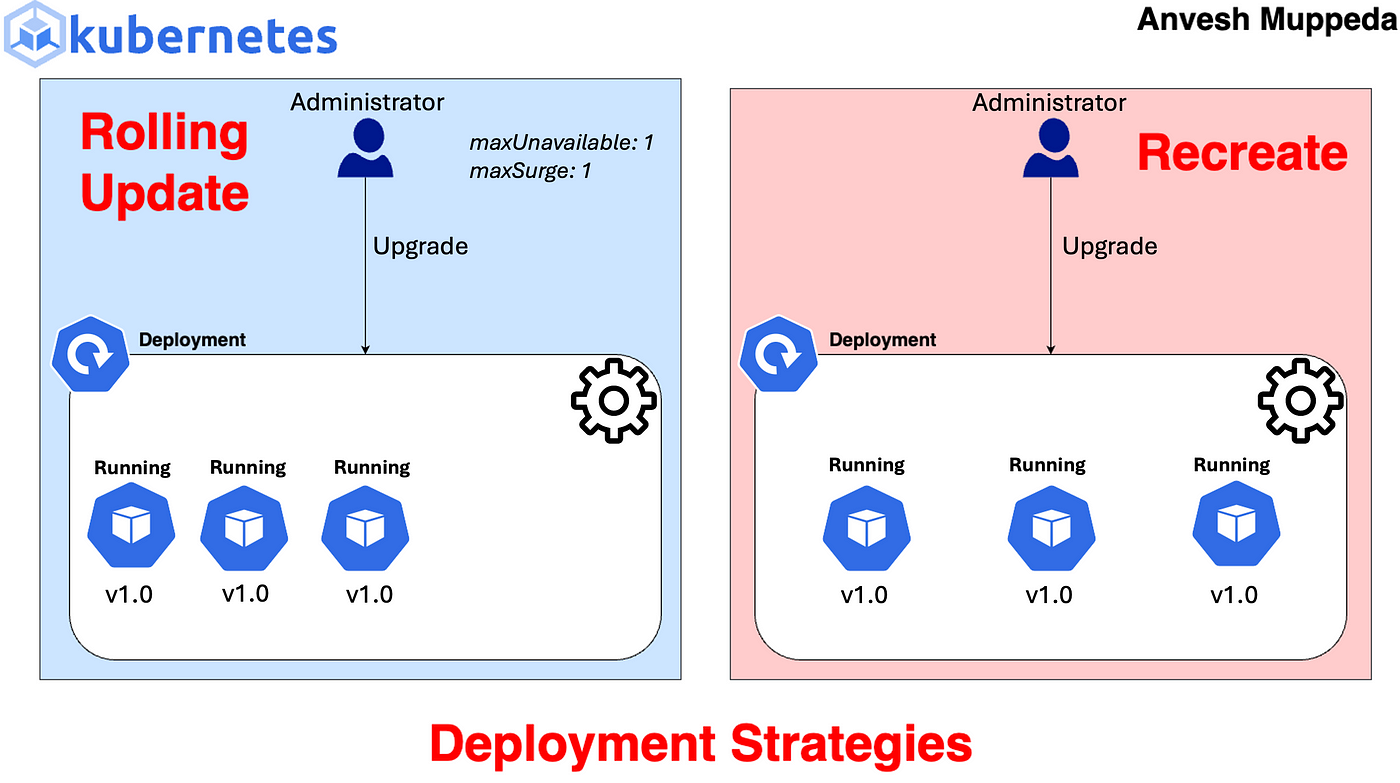
The most basic strategy—ideal for non-critical environments.
All existing pods are terminated first, followed by the creation of new pods with the updated image. This results in unavoidable downtime.
  kind: Deployment
  apiVersion: apps/v1
  metadata:
    name: online-shop-app-deployment
    namespace: online-shop-app
  spec:
    replicas: 4 # Number of pod replicas to maintain
    strategy:
      type: Recreate # Deployment strategy type
    selector:
      matchLabels:
        apps: online-shop-app  # Label selector for pods
    template:
      metadata:
        labels:
          apps: online-shop-app  # Labels for the pod template
      spec:
        containers:
          - name: online-shop-app  # Container name
            image: pkmadhubani/online-shop-app:latest  # Container image
            ports:
              - containerPort: 80 # Port exposed by the container
            resources:
              requests:
                cpu: "100m"  # Minimum CPU required
                memory: "125Mi" # Minimum memory required
              limits:
                cpu: "200m" # Maximum CPU allowed
                memory: "256Mi" # Maximum memory allowed
2. Rolling Update Strategy (Default)
The most commonly used strategy for achieving near-zero downtime.Kubernetes incrementally replaces old pods with new ones, with configurable controls via maxSurge (extra pods allowed) and maxUnavailable (pods that can be down simultaneously).

kind: Deployment
apiVersion: apps/v1
metadata:
  name: online-shop-app-deployment
  namespace: online-shop-app
spec:
  replicas: 4  # Number of pod replicas to maintain
  strategy:
    type: RollingUpdate  # Deployment strategy type
    rollingUpdate:
      maxSurge: 1  # Maximum number of pods that can be created above the desired number of pods
      maxUnavailable: 0  # Maximum number of pods that can be unavailable during the update
  selector:
    matchLabels:
      apps: online-shop-app  # Label selector for pods
  template:
    metadata:
      labels:
        apps: online-shop-app  # Labels for the pod template
    spec:
      containers:
        - name: online-shop-app  # Container name
          image: pkmadhubani/online-shop-app:latest  # Container image
          ports:
            - containerPort: 80  # Port exposed by the container
          resources:
            requests:
              cpu: "100m"  # Minimum CPU required
              memory: "125Mi"  # Minimum memory required
            limits:
              cpu: "200m"  # Maximum CPU allowed
              memory: "256Mi"  # Maximum memory allowed

3. Blue-Green Deployment
Designed for instant traffic switching and rapid rollbacks. Two identical environments are maintained: Blue (current live version) and Green (new version). The new release is fully deployed and tested on Green before traffic is switched over in one atomic operation.

kind: Deployment
apiVersion: apps/v1
metadata:
  name: online-shop-app-deployment-blue
  namespace: online-shop-app
spec:
  replicas: 4  # Number of pod replicas to maintain
  selector:
    matchLabels:
      apps: online-shop-app-blue  # Label selector for pods
  template:
    metadata:
      labels:
        apps: online-shop-app-blue  # Labels for the pod template
    spec:
      containers:
        - name: online-shop-app-blue  # Container name
          image: pkmadhubani/online-shop-app:latest  # Container image
          ports:
            - containerPort: 80  # Port exposed by the container
          resources:
            requests:
              cpu: "100m"  # Minimum CPU required
              memory: "125Mi"  # Minimum memory required
            limits:
              cpu: "200m"  # Maximum CPU allowed
              memory: "256Mi"  # Maximum memory allowed
kind: Deployment
apiVersion: apps/v1
metadata:
  name: online-shop-app-deployment-green
  namespace: online-shop-app
spec:
  replicas: 4  # Number of pod replicas to maintain
  selector:
    matchLabels:
      apps: online-shop-app-green  # Label selector for pods
  template:
    metadata:
      labels:
        apps: online-shop-app-green  # Labels for the pod template
    spec:
      containers:
        - name: online-shop-app-green  # Container name
          image: pkmadhubani/online-shop-app-updated:latest  # Container image
          ports:
            - containerPort: 80  # Port exposed by the container
          resources:
            requests:
              cpu: "100m"  # Minimum CPU required
              memory: "125Mi"  # Minimum memory required
            limits:
              cpu: "200m"  # Maximum CPU allowed
              memory: "256Mi"  # Maximum memory allowed
kind: Service
apiVersion: v1
metadata:
  name: online-shop-app-svc-blue
  namespace: online-shop-app
spec:
  selector:
    apps: online-shop-app-green  # Label selector for the pods targeted by this service
  ports:
    - protocol: "TCP"  # Protocol used by the service
      port: 80  # Port exposed by the service
      targetPort: 80  # Port on the container to forward traffic to
  type: ClusterIP  # Service type, providing an internal IP for communication within the cluster
4. Canary Deployment
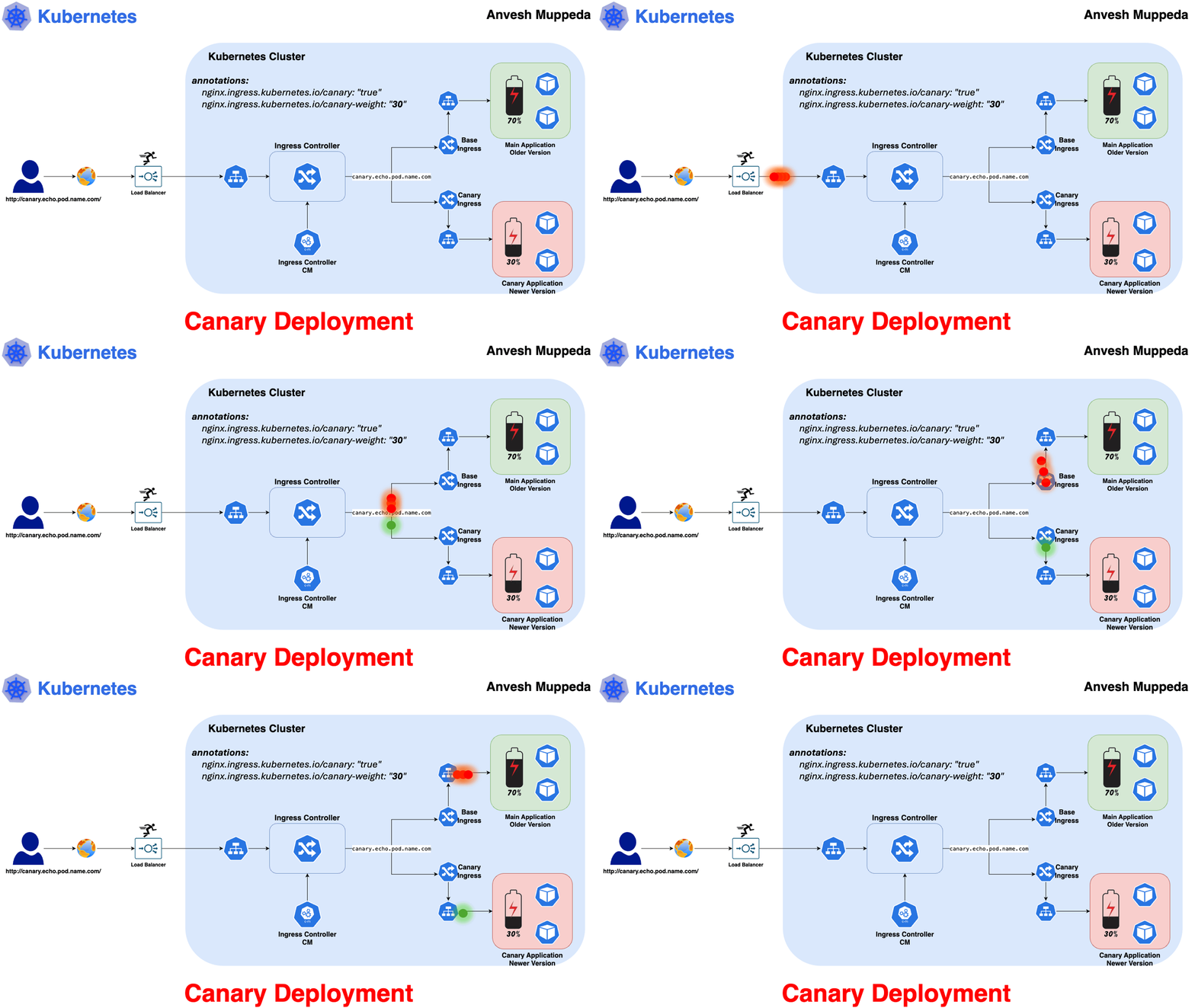
The safest approach for risk mitigation through gradual exposure. A small percentage of traffic is routed to the new version initially, allowing close monitoring before full rollout.
kind: Deployment
apiVersion: apps/v1
metadata:
  name: apache-deployment
  namespace: canary
  labels:
    apps: apache
    version: v1
spec:
  replicas: 1
  selector:
    matchLabels:
      apps: apache
      version: v1
  template:
    metadata:
      labels:
        apps: apache
        version: v1
    spec:
      containers:
        - name: apache
          image: httpd:alpine3.23
          ports:
            - containerPort: 80
          resources:
            requests:
              cpu: "100m"
              memory: "125Mi"
            limits:
              cpu: "200m"
              memory: "256Mi"
          volumeMounts:
            - name: apache-config
              mountPath: /usr/local/apache2/htdocs/index.html
              subPath: index.html
      volumes:
        - name: apache-config
          configMap:
            name: apache-configmap
kind: Deployment
apiVersion: apps/v1
metadata:
  name: nginx-deployment
  namespace: canary
  labels:
    apps: apache
    version: v2
spec:
  replicas: 4
  selector:
    matchLabels:
      apps: apache
      version: v2
  template:
    metadata:
      labels:
        apps: apache
        version: v2
    spec:
      containers:
        - name: nginx
          image: nginx:alpine
          ports:
            - containerPort: 80
          resources:
            requests:
              cpu: "100m"
              memory: "125Mi"
            limits:
              cpu: "200m"
              memory: "256Mi"
          volumeMounts:
            - name: nginx-config
              mountPath: /usr/share/nginx/html/index.html
              subPath: index.html
      volumes:
        - name: nginx-config
          configMap:
            name: nginx-configmap
kind: Service
apiVersion: v1
metadata:
  name: service-apache
  namespace: canary
spec:
  selector:
    apps: apache
  ports:
    - protocol: "TCP"
      port: 80
      targetPort: 80
  type: ClusterIP
kind: Ingress
apiVersion: networking.k8s.io/v1
metadata:
  name: canary-ingress
  namespace: canary
spec:
  ingressClassName: nginx
  rules:
    - http:
        paths:
          - path: /
            pathType: Prefix
            backend:
              service:
                name: service-apache
                port:
                  number: 80
Manual Canary Example (Traffic Distribution via Replica Scaling):
Assume:
apache-deployment: Old version
nginx-deployment: New version
  kubectl scale deployment/apache-deployment -n canary --replicas=4
  kubectl scale deployment/nginx-deployment -n canary --replicas=2
This routes approximately 66% traffic to the old version and 33% to the new version (based on pod count and round-robin load balancing). Monitor closely, then scale the new version up and old down if stable.
Conclusion
As of 2025, Rolling Update remains the reliable default for most scenarios. For higher-stakes environments, Blue-Green and Canary deployments—enhanced by advanced tools—are becoming standard practices for safer, more controlled releases.
